


Video Downloader TSaver
4.382.00 Reviews
App Specs
- Version
- 1.6
- Updated On
- License
- Free
- Downloads
- 5,000,000+
- Developer
- Dark Blue Apps
- Categories
- Video Players & Editors
- Platform
- Android
Screenshots

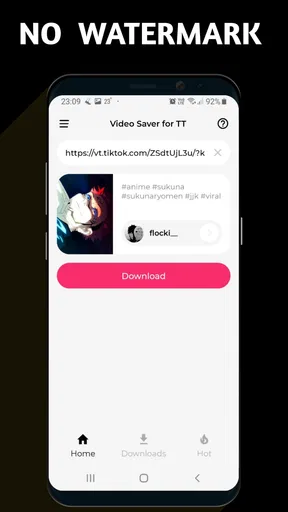
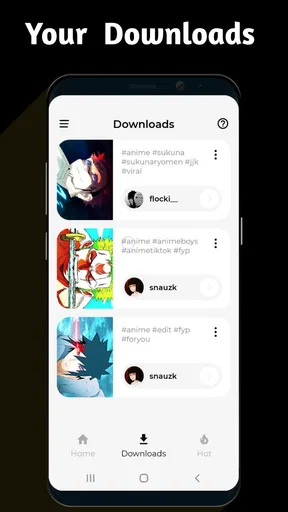
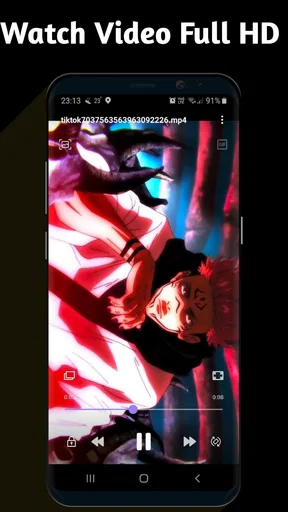

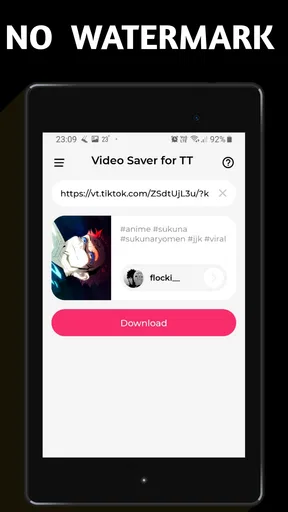

 Analysis by AppCompare
When I try a video downloader, I care less about a long feature list and more about one practical question: can I save a clip cleanly and use it again without fighting the interface? Video Downloader TSaver is built around that simple job. It is an Android app from Dark Blue Apps in the video players and editors category, and its most useful promise is straightforward: downloading videos without a watermark and setting a video as a live wallpaper.
I found the watermark-free angle more important than it may sound. A saved clip with an added logo or label can look unfinished when I want to keep it for personal viewing, edit it elsewhere, or use it as part of a phone background. TSaver focuses on removing that visual distraction rather than trying to become a full editing suite. That makes it easier to understand than many broader video tools, although it also means the app is best judged as a focused utility, not an all-purpose media studio.
What the watermark-free download capability changes
The main benefit is control over the copy I keep on my device. When a video is downloaded without a watermark, the frame remains visually cleaner, which matters if I am saving a short recipe, a travel clip, a family video, or a reference video for later. I do not have to crop away a corner afterward, and I am less likely to lose useful picture area while trying to hide an overlaid mark.
That does not automatically make every download suitable for every purpose. A clean-looking file is still subject to the rights and rules attached to the original video. I would use TSaver for content I am allowed to save, such as my own uploads or material whose creator permits downloading. The app makes the file-handling step more convenient; it does not change ownership or grant permission to redistribute somebody else’s work.
The second notable capability is turning a video into a live wallpaper. In practice, this connects the download task with something more personal. Instead of saving a clip only to watch it in the gallery, I can make it part of the phone’s visual experience. A moving background can be pleasant for a favorite scenery clip, a calm animation, or a short personal recording. It is a more specific use than ordinary downloading, but it gives the app a reason to stay installed after the first saved video.
The strongest part of TSaver is the short path from finding a permitted video to keeping a cleaner copy for a defined purpose. It is not trying to replace a professional editor. Its appeal is the reduction of small annoyances: visible branding, extra steps, and the need to move between several unrelated tools just to save and reuse a clip.
How I would use it in practice
My first step would be deciding what I actually need from the video. If I only want to watch it once, downloading may be unnecessary. If I need an offline reference, want to share my own clip through another workflow, or plan to use a video as a live wallpaper, TSaver becomes more relevant. That small decision prevents the app from turning the phone into a storage bin full of files I never open again.
Worth Reading Before You Choose

EA SPORTS FC Mobile 26 Is a Bigger Football Game, but It Takes Time

Flipboard Shows What News Apps Must Do Beyond the Feed

Switching to Android Auto Means Rethinking Your Driving Routine

Google Calendar Makes a Crowded Week Easier to Manage

Ludo King Makes the Most of the Minutes Between Plans

Baby Panda World Brings Quick Play to Modern Phones, but Its Game Library Feels Busy
For a permitted video, I would use the app’s download workflow and then check the resulting file before relying on it. The important checks are simple: confirm that the complete clip is present, make sure the picture looks correct, and verify that the file appears where I expect it. This is especially useful before deleting the original source or sending the saved file to another application.
The watermark-free result is most valuable when I plan to do something afterward. For example, I might save a short demonstration from my own account, inspect it on a larger screen, and then bring it into a separate editor. Without a watermark occupying part of the image, I have more freedom to crop, add captions, or place the clip beside other material. TSaver handles the clean download; I would still choose another editor for trimming, transitions, audio mixing, or detailed color work.
For live wallpaper, I would choose a short clip that remains attractive when repeated. A video that works as a one-time sequence may become distracting when it loops on the home screen. Slow movement usually makes more sense than a clip with rapid cuts or constant text. I would also check how the wallpaper looks behind icons, because a detailed background can make app labels harder to read even when the video itself looks good.
One useful habit is to keep the original context in mind. If I save several similar clips, I would rename or organize them immediately rather than relying on vague default filenames. This is a small workflow improvement, but it matters because download utilities can quickly create a messy media folder. TSaver is more helpful when I treat it as part of a simple save, check, and organize routine instead of pressing download without a plan.
A realistic everyday scenario
Imagine I record a short walking tour for a personal project and publish it through a service that adds its own mark to exported copies. Later, I want a clean version on my phone so I can compare the footage with another edit and use a calm section as a moving background. I would use TSaver to keep the permitted video without the distracting watermark, check the saved copy, and then select the portion that feels suitable for the wallpaper use.
That scenario shows where the app makes sense. I am not asking it to edit the video, improve the sound, or manage a complete production library. I am asking it to preserve a cleaner copy and make the clip usable in a different phone context. The time saved comes from avoiding a separate watermark-removal step or a workaround that might reduce image quality through unnecessary cropping.
Another practical case is offline preparation. Before a trip, I might save my own instructional clips or permitted reference videos so I can review them when connectivity is inconvenient. The value is not just having a file; it is having a version that remains readable and visually uncluttered. If the clip contains small labels or demonstrations near the edges, avoiding a watermark can preserve details that cropping would remove.
Where the experience has tradeoffs
TSaver’s narrow focus is both its advantage and its limitation. I like that the central purpose is easy to grasp, but anyone expecting a complete editor may feel restricted. The app should not be my first choice for cutting a long recording into scenes, correcting audio, adding layered text, or producing a polished social video. A dedicated editor will offer more precise controls and a clearer production timeline.
The live wallpaper option also needs realistic expectations. A moving background can consume more attention than a static image, and it may not suit people who prefer a quiet, minimal home screen. I would also avoid using a visually busy clip behind many icons. The feature is appealing for selected videos, but it is not automatically an improvement over a still wallpaper.
Storage is another practical consideration. Video files take more room than ordinary images, and keeping multiple downloads can make the phone’s gallery harder to manage. I would review saved clips periodically and remove duplicates or temporary files. This is not a reason to reject the app, but it is a reason to use it deliberately, especially on a device with limited free space.
Compatibility can also affect the experience. TSaver runs on Android devices using version 6.0 or later, so it is accessible across a broad range of phones, but the exact behavior of downloaded media and live wallpapers can still vary by device. Screen shape, launcher behavior, battery settings, and system wallpaper controls may influence how a video feels in daily use. I would test one short clip before building a larger wallpaper collection.
The app is free, which removes a purchase decision for someone who wants to try the basic workflow. Free does not mean every video source will behave identically, though. I would expect the smoothest experience with content that is clearly available for saving and would avoid treating the app as a way around platform restrictions. The responsible use case is important here: convenience should not replace permission.
There is also a quality tradeoff worth considering. A watermark-free file may look cleaner, but the source resolution and compression still determine how good it appears. Removing a visual mark cannot restore detail that was already lost in the original video. I would judge the result on the actual clip rather than assuming that a clean frame means a high-quality file.
How it compares with usual alternatives
The usual alternative is to rely on a platform’s built-in save or offline function. That can be the better choice when I only need temporary access inside the original service, because the content remains connected to the platform and does not add another file to my gallery. TSaver becomes more attractive when I need a local video for a permitted personal workflow or want to use it as a live wallpaper.
Another alternative is screen recording. I would use that only as a last resort for content I am allowed to capture, because it can introduce interface elements, notification interruptions, lower visual quality, and extra trimming work. A direct download workflow is cleaner when it works for the video in question. The difference is especially noticeable when the purpose is a wallpaper, since unwanted controls or borders can make the result look poor.
A general file manager can organize videos, but it does not replace a purpose-built downloader. An editing application can produce a polished result, but it may be excessive when I simply want to save a clean clip. TSaver sits between those options: more focused than an editor and more action-oriented than a file browser. That position is useful for people who repeatedly need the same narrow task, but less useful for someone who downloads video only occasionally.
For advanced creators, I would pair TSaver with a proper editor rather than expecting one app to do everything. The downloader can provide a cleaner starting file, while the editor handles the creative work. This two-tool approach is often more efficient than forcing a basic downloader to perform tasks it was not designed to handle.
Who gets the most value from it
I think TSaver suits people who regularly save permitted videos and care about how those files look afterward. It is a good match for someone collecting personal clips, keeping offline references, preparing media for another app, or experimenting with video wallpapers. The watermark-free result is especially useful when the saved video will be viewed outside its original service or placed into a new visual composition.
It can also help users who are not comfortable with complicated editing software. The workflow is easier to justify when the goal is simply to keep a clean copy rather than learn timelines, layers, and export settings. I would recommend it to a friend who wants a focused Android utility and does not need a full creative workstation.
On the other hand, I would skip it if my main need is professional editing, cloud collaboration, detailed media cataloging, or advanced conversion control. I would also skip it if I rarely save videos and already have a satisfactory official offline option. Installing another app only makes sense when the watermark-free download or live-wallpaper use solves a recurring problem.
The app has reached over five million installs and holds a 4.3 average from around ninety-five thousand ratings, which suggests that its focused purpose resonates with a substantial Android audience. Its content rating is Everyone, and the current version is 1.6. Those details make it approachable for a wide range of users, but they do not remove the need to use the downloader thoughtfully and respect the source of each video.
My recommendation after using the workflow
Video Downloader TSaver is most convincing when I judge it by its central capability rather than by expecting a complete video suite. Saving a video without a watermark can make a real difference when I need a cleaner personal copy, want to preserve edge details, or plan to turn the clip into a live wallpaper. The benefit is practical, not flashy: fewer visual distractions and fewer steps between a permitted video and a usable file.
I would install it for a specific routine, such as saving my own clips, preparing offline references, or testing personal videos as moving backgrounds. I would keep a separate editor for serious creative work and use official platform features when temporary offline viewing is enough. That division of responsibilities gives TSaver a clear role instead of asking it to solve every video problem.
For Android users on version 6.0 or later, the free entry point makes experimentation easy. My honest view is that it is worth trying if watermark-free downloads are a repeated need, while occasional downloaders may not notice enough benefit to justify another media utility. Used with sensible file organization and respect for content permissions, Video Downloader TSaver is a focused, useful choice for cleaner saved videos and selective live-wallpaper experiments.
Pros
- Downloads videos quickly from supported social platforms.
- Simple interface makes saving videos easy for beginners.
- Supports multiple video resolutions when available.
- Built-in preview helps confirm the correct video before downloading.
- Saved files can be watched offline without using mobile data.
Cons
- Platform compatibility may change when social networks update their policies.
- Some downloads may fail for private or restricted videos.
- The app may display ads during browsing or downloading.
- Downloaded videos can use considerable device storage space.
- Respect copyright and creator permissions before saving or sharing content.
FAQs for Video Downloader TSaver
What is Video Downloader TSaver and what can it do?
Video Downloader TSaver is designed to help users save supported online videos for later viewing on their mobile device. After installing it, you can generally browse or paste a video link, select an available download option, and manage saved files from within the app. Its exact features may depend on the source website, device, app version, and the permissions granted during setup.
Is Video Downloader TSaver free to download and use?
The application may be available to download without an upfront charge, but users should check the current store listing for advertising, optional purchases, subscriptions, or feature restrictions. Some download tools limit certain formats, quality levels, or daily activity unless you use a premium option. Before confirming any payment, carefully review the price, renewal terms, and cancellation instructions shown by Google Play or the App Store.
Which websites and video platforms are supported by Video Downloader TSaver?
Support can vary considerably between versions of Video Downloader TSaver and the services it connects to. A link that works today may stop working if a platform changes its technology, requires an account, blocks downloads, or restricts access by region. Do not assume that every social network or streaming service is compatible. Test only content you are authorized to save and consult the app’s current description for supported sources.
Where are downloaded videos stored, and can they be watched offline?
Downloaded files are usually placed in a folder selected by the app or in a location visible through the device’s file manager, gallery, or an internal download library. Storage requirements depend on the chosen resolution and the number of videos saved. Once a file has completed downloading, it may be playable without an internet connection, although some protected or streaming-only content cannot be exported or viewed outside its original platform.
Is it legal and safe to download videos with Video Downloader TSaver?
The app itself does not determine whether a particular download is lawful. You should save only videos that you own, have permission to download, or that the platform explicitly makes available for offline use. Downloading copyrighted material without authorization may violate copyright rules or a service’s terms. For safety, install the app from an official store, review requested permissions, avoid suspicious links, and keep your device and security software updated.


